For debugging and troubleshooting performance issues
As part of hosting of DotNetNuke sites, I often take a look at the processor and memory usage of the various processes running on our servers using Task Manager. Prior to recent changes though, I didn't really have any way to really know which of my sites was really having the biggest impact as all I could really see was a list of the worker processes (w3wp.exe) associated with the app pools. The UserName for each w3wp.exe process was Network Service. I did notice that one of the worker processes, averaged around 14% of the overall utilization while most of them averaged 0% percent with an occasional bump up to 1% or 2%. I figured this must have been one of the busier sites we hosted. I was wrong...
Read More...
David O'Leary |
3/23/2011 |
Comments (0) |
DotNetNuke, Blog
 Far too often, clients and developers vastly underestimate the complexity involved for their simple online store or E-Commerce project. It might seem basic: show some products/services, add them to a cart, make payment, & ship... The reality however is often much more involved. Options, discounts, gifts, shipping options, referrals, and more combine together in a way that the complexity can quickly grow exponentially. With this complexity, custom-built solutions or online stores built by individuals prove inadequate or get so convoluted as features are added they become impossible to administer, maintain, and update.
Sometimes a few PayPal buttons or a basic shopping cart will meet your needs. But usually, you really need a really well-architected solution that has an active and strong development team behind it, a nice array of features, and an extensible architecture that will allow it to grow to meet the needs of the customer. Fortunately, the are some really great open-source E-Commerce solutions(Magento and NOPCommerce are two of our favorites) and affordable commercial E-Commerce offerings (AbleCommerce is our current favorite) available.
The key, is making sure that early in the process, you are properly anticipating the current and future needs of the client. This article lays out the list of que
Read More...
Eric Berger |
2/10/2011 |
Comments (0) |
Blog, Business, E-Commerce
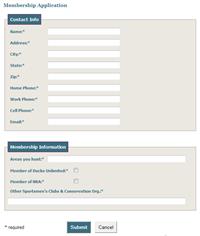
The are lots of very powerful forms modules available for DotNetNuke, but many of them seem like overkill for what we are usually looking for. The Form and List module often meets our functional needs when we are looking for a simple form module but in the past, I was disappointed with the look of the forms it produced.
The Form and List team, (mostly Stefan Cullmann), has done a nice job of adding features to improve the styling options. In particular, I like the ability to use CSS and Separators/Fieldsets for form layout.
Stefan wrote a brief blog showing how he styled the Feedback Form on the formandlist.com site. We used that as our starting point for a membership form we created and found we needed some additional tweaking to get the form looking just right...
Read More...
David O'Leary |
1/5/2011 |
Comments (1) |
DotNetNuke, Blog
This is the first in what we plan on being a 3 part series on improving the tracking and reporting of Ad viewership and clickthroughs within DNN.
Overall, DotNetNuke'sBanner / Ad / Vendor implementation is a nice solution. It does a great job of serving up the appropriate ads based on a nice variety of options. But there's been very little change to the implementation over the last few years and we've found some areas of needed improvement. Efficion is hoping to contribute new features and improvements to these modules based on work we've done to bring it up to the next level.
One of the biggest weaknesses we found was it's reporting capabilities. It's easy enough for us to create reports for our clients (we'll be covering that in Part II of this series) but in this case, we didn't have the data we needed.
Our client wanted to be able to provided statistics on the views and clicks of their ads for a given time period (i.e. September 2010). The problem is, DNN only stores the total number of clicks and views for a given ad. There's no associated time period with those numbers.
So, we need to start storing clicks and views in a way that is time oriented. After some thought on this we decided that we should really accumulate the numbers on daily basis for each ad. Daily seems to be the standard in the analytics world and provides enough granularity to get the time frame you want while also not collecting data at too granular a level.
Daily totals will make it easy to create reports that show totals for a given period or to create trend charts for a particular ad or all ads over a given time period.
Read More...
David O'Leary |
10/9/2010 |
Comments (2) |
DotNetNuke, Blog
This is partially based on a script provided by JosephStyons in this thread on Stack Overflow. Joseph's script parses the name into Title, First, Middle, and Last. For my purposes, I only needed the first name and so was able to simplify the script and breaking it out into a function makes it easy for us to reuse in a variety of places.
Read More...
David O'Leary |
9/29/2010 |
Comments (1) |
Blog
We've been working on our first site that really makes heavy use of DotNetNuke's Banners module for displaying revenue generating ads. Today I was trying to get the banners module to work for a Newsletter piece (more on that later) of the site that has a very tight layout but the way Banners is implemented didn't allow me to do what I needed. Currently, the banners module renders banners in a table and the only way to add spacing between banners is by setting cellpadding and/or cellspacing. We needed a solution where we could ad space between the banners without adding space on the sides of the banners. This wasn't possible with the current implemenation (other than by adding whitespace to the banner images which we didn't feel was a good solution) so we needed another solution.
I could have gone in and made a couple quick changes to the banners module to get it to do what I needed but then, we would've have had to reapply the changes every time we upgraded the site.
Instead, I spent about 10 minutes creating a new module based on the existing banners module. Luckily, DNN makes this easy.
The change to the code is the easy part (though really it was all very easy). I just changed the RepeatLayout attribute for the DataList to "Flow" instead of the default "Table" and then added a class to the label within which the banner is implemented.
The more involved process was copying and renaming the files and class. In all though, it took less then 10 minutes to think up and implement this solution.
Read More...
David O'Leary |
6/9/2010 |
Comments (1) |
DotNetNuke
Last week, we put a lot of effort into improvements to the search and RSS aspects of Efficion's Articles module. As part of that, we noticed that no matter how many times you hit the Re-Index content link on the Host->Search Admin page, the links never actually get updated. As we dug further, it became clear that to update the links used by DNN's search and RSS, you actually have to purge the search tables.
This has implications beyond our module so I thought I'd share the steps as a good practice to do every once in awhile on your DNN site to make sure you Search Results and RSS Feeds are linking properly.
Read More...
David O'Leary |
4/28/2010 |
Comments (0) |
DotNetNuke, Blog
As most HTML aware folks know that when you paste content from Microsoft Word or Outlook for use as HTML, it includes all sorts of gobbledygook that clutters up your markup and overrides your CSS. Luckily, the fckEditor has a couple ways to handle this. If you're pasting from Word into the editor using IE, it pops up a dialog that gives you a chance to clean up the markup which is nice. If you're using Firefox you can achieve the same results by clicking on the special Paste from Word icon. But, there's an issue...
Read More...
David O'Leary |
4/9/2010 |
Comments (0) |
DotNetNuke, Blog
One of the under-utilized features in the DotNetNuke module development API is the ability to utilize DotNetNuke's built in Permissions architecture within your own custom modules.
Rather than having to write your own code to display a grid of available roles and special permissions, it's fairly easy to add your permissions to the existing permissions grid that usually just displays "View" and "Edit".
I found a nice article that gives a very good overview on how to do this
Extending DotNetNuke Module Permissions for Custom Modules
|
7/25/2009 |
Comments (0) |
DotNetNuke, Blog
As I build out the settings for DotNetNuke modules, I only like to display settings that are relevant to the other selections the user has made. The best way to do this is with Javascript so users don't have to wait for a postback everytime they change a relevant control.
In trying to put these things in place, I often find the code often doesn't work quite the way I expect (or at least used to expect) it to. The issue usually has to do with the way asp.net renders controls. I usually find I have to dig into the source view a bit to see exactly how asp.net rendered something and then fiddle a bit to get everything working right.
Here, I'll describe, one particular case where I had two checkboxes linked. The 2nd checkbox should only be displayed when the first checkbox is checked...
Read More...
|
7/24/2009 |
Comments (0) |
DotNetNuke, Blog