Does your company use lots of spreadsheets? Is there a crazy amount on internal email to keep track of everything? Are there tons of meetings to keep everyone on the same page? There's probably a better way. The quality and effectiveness of business-focused software has come a long way in the last few years and costs have come way down.
Efficion is focused on helping companies run more efficiently by utilizing powerful software packages like Customer Relationship Management systems (CRM), Issue Tracking Software, Order Management Systems, Enterprise Resource Planning (ERP) systems, Data Integration Services, Intranets, E-Commerce, and more. We integrate data from systems so your people don't have to go 8 different places to try to piece it all together. We help small and mid-size sized companies run like well-oiled machines.
We are currently seeking new clients, which is fairly rare. So if you think your company might benefit from our services, let us know.
|
6/19/2019 |
Comments (1) |
Blog
I recently saw some articles about well-respected free SSL certificates from Lets Encrypt. Not only are Let's Encrypt certificates free, but they are also much easier to setup because the whole process is automated and, once you've got DNN properly configured, completes in about 10 seconds as opposed to a whole lot of manual steps for most SSL Certs.
Most of the Lets Encrypt stuff is intended for Linux machines but there are now nice solutions for Windows Servers running IIS. As I tried to add a certificate to a DNN site, I ran into a few issues but they were fairly easy to solve.
There are a couple other blogs that describe similar solutions, this one uses the LetsEncrypt-Win-Simple command line utility but is otherwise nice and simple. I prefer, the Certify The Web application as it has a nice UI and is simple to use.
Read More...
|
5/2/2018 |
Comments (0) |
DotNetNuke
Look at Reports -> Message Traffic. Look at the total number of messages being sent under Trend mode. Then switch to Domain mode and verify the numbers are similar.
Search your Delivery Logs (Manage -> Troubleshooting -> View Logs) for "Sending remote mail" and verify all the email addresses involved are valid for your server.
Check your Spool - you may have a bunch of emails trying to go to invalid email addresses.
Administrator Account |
10/6/2017 |
Comments (0) |
Blog
Administrator Account |
12/4/2013 |
Comments (2) |
DotNetNuke, Blog
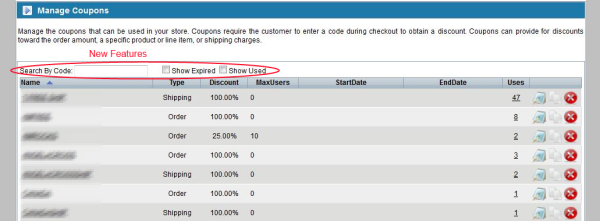
AbleCommerce is a great E-Commerce solution but there are a few areas that need improvement and Coupon administration is one of them. We've created a new version of the /Admin/Marketing/Coupons/Default.aspx page that filters out Used and Expired Coupons by default and lets you search for a particular coupon code quickly and easily. The code is quite simple so rather than try to sell this, we're making it available to everyone for free.
Download the code
To install the code, first, MAKE A BACKUP of the original files then simply replace Admin/Marketing/Coupons/Default.aspx and Admin/Marketing/Coupons/Default.aspx.cs with the corresponding files in the zip (do not place the files in the root of your install) and run the SQL in the root of the zip to create the Stored Procedure that is used by the code.
We welcome suggestions for improvements to the code and would be happy to set it up on CodePlex or GitHub or similar so others can contribute.
David O'Leary |
6/13/2013 |
Comments (0) |
AbleCommerce
David O'Leary |
12/5/2012 |
Comments (1) |
E-Commerce, AbleCommerce
In theory, all skin development should probably happen on a development instance and the live site should only be updated once the skin updates are complete. But, in practice, we find lots of cases where we do need to be able to make CSS updates to a live instance (though not necessarily a live site) of DNN.
You can do this by updating the .css file and then clicking "Clear Cache" in the control panel. But, every time you do that, a new version of the combined files is created and users will need to download the file again. So, it's best to avoid that.
What I've found works better is to create a <style></style> section within your skin and for any changes you want to make, make those changes within that style section. Once you've got all your changes done, migrate them into the .css file and delete the <style></style> section from the skin, and clear the cache. That method allows us to quickly and painlessly make changes.
Also, for experimenting with minor updates, Firebug is a great tool as you can see what your changes will look like and then apply them when you're happy with them.
Happy coding!
David O'Leary |
9/11/2012 |
Comments (0) |
DotNetNuke
 Making adding modules easier for admins
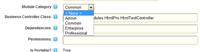
Since the new Ribbon control panel for DotNetNuke has been out, it has seriously bugged me that when you go to add a module, the default module Category is Common and the only module in that category was the HTML module. Because of that, the new Category just made things more confusing.
Making adding modules easier for admins
Since the new Ribbon control panel for DotNetNuke has been out, it has seriously bugged me that when you go to add a module, the default module Category is Common and the only module in that category was the HTML module. Because of that, the new Category just made things more confusing.
Today, an intern at one of my clients was trying to make a simple change to the home page of their site and added the Configuration Manager module to the home page. This caused the home page to force users to login and due to another issue caused an error for anyone going to the homepage. Bad.
Once I got that fixed up, I finally had the needed incentive to dig a bit further into the Module Categories piece to help avoid this in the future. As it turns out, it's quite easy to add modules to the Common category.
Just go to Host->Extensions and edit the module you want to add to Common. Then, select Common for the Module Category. That's it.
Now that the Common category actually includes the common modules, I really like that feature and hope it will make it much easier (and safer) for our clients to edit their content.
For our clients, we're doing this for all sites where clients edit there own content. Generally I include the following modules: Efficion's Articles, HTML, Documents, Links, and Ventrian Gallery.
Learn more from this post from Charles Nurse on Module Categories
David O'Leary |
6/19/2012 |
Comments (1) |
DotNetNuke
One day, one of my clients noticed that when he tried to click on a link to his site through Facebook, the link was blocked with the following message:
The link you are trying to visit has been reported as abusive by Facebook users. To learn more about staying safe on the internet, visit Facebook's Security Page. Please also read the Wikipedia articles on malware and phishing.
It took us quite a bit of digging to figure out how to best address this and so I'm hoping I can make this process easier for others...
Read More...
Administrator Account |
4/13/2012 |
Comments (9) |
 Log Based Analytics provide a new perspective
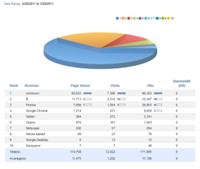
We use Google Analytics extensively for tracking and analyzing website statistics. It does a great job of providing really useful information in a way that anyone can understand. Plus, its very easy to setup and has the power to let advanced users segment and drill down through the data to get even more detailed information. But, we've found it's a good idea to get another view of your visitors and traffic using a tool that provides information based on Log Analysis. Log based analytics let your see things that simply can't be tracked by script-based analyzers like Google Analytics.
As a big fan of SmarterMail, we decided to give SmarterStats a try. We've been using SmarterStats for awhile on several of our bigger sites but we also wanted to be able to use it on a few of our portals where we have multiple sites installed on a single instance of DotNetNuke. Before we could do this, we needed to do several things first to get this to work right...
Read More...
David O'Leary |
3/25/2011 |
Comments (8) |
DotNetNuke, Blog